A Liebherr SmartDeviceBox is the small connectivity module that gives a Liebherr refrigerator, freezer, or Monolith column its Wi-Fi link to the Liebherr SmartDevice app. It is not the app itself and not a separate accessory you buy at a store — on Monolith columns and many current refrigerators it ships already fitted inside the unit, listed on the spec plate simply as “Connectivity: SmartDeviceBox Wi-Fi.” Understanding what the box actually is helps before you troubleshoot a connection problem, order a replacement part, or decide whether an older unit can be added to the app at all.
What does a Liebherr SmartDeviceBox actually do?
The SmartDeviceBox sits between the appliance’s own control board and your home network. The control board already knows the internal temperature, whether a door is open, and whether an alarm condition exists — it has always tracked that information to run the compressor and defrost cycle correctly. What the SmartDeviceBox adds is a way to send that information off the appliance and onto your phone, and to receive setting changes back the other way. Without it, the appliance works exactly the same; you simply lose the remote visibility and the ability to change settings from the app.
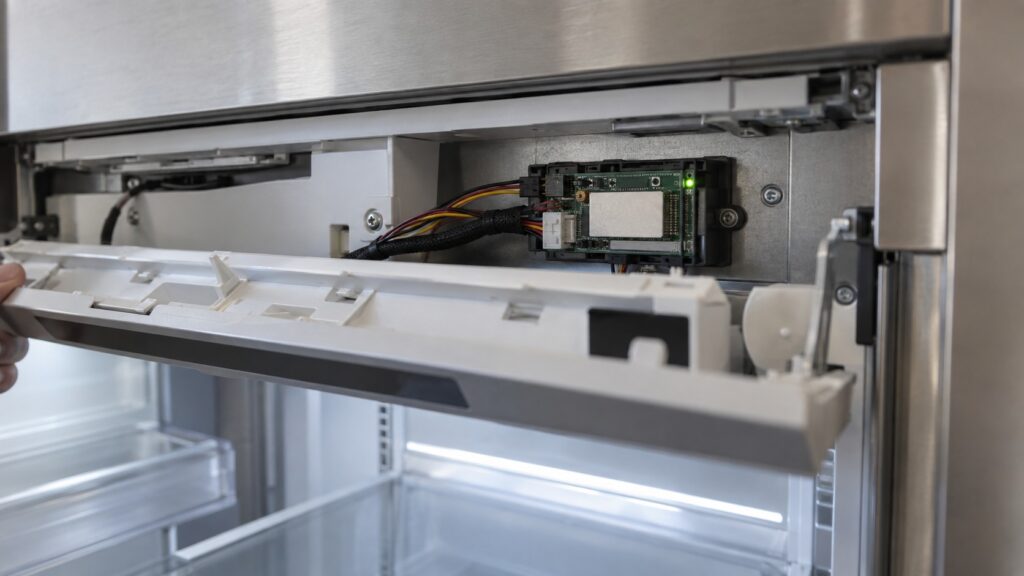
On a Monolith column, the module usually sits near the top of the cabinet, close to the control display, where it also has the best signal path through the surrounding cabinetry. On freestanding refrigerators and freezers that offer it, the box is fitted at the factory and is not something a homeowner opens up to inspect during normal use.
How do I know if my unit has one?
The fastest check is the control panel: if the display has a Wi-Fi icon, or the model’s included manual lists app pairing steps, the appliance has a SmartDeviceBox already fitted. The unit’s spec plate, visible on the interior wall or door frame, also lists “Connectivity” as a line item on models built with one. If that line is absent, or the manual has no pairing section, the unit was built without the module and cannot be added to the app through a simple accessory purchase — this is more common on older refrigerator and freezer models than on current Monolith columns, where it now ships standard.
Can a SmartDeviceBox be added to a unit that did not ship with one?
Generally, no, not as a simple homeowner accessory. The module is wired into the appliance’s own control board during manufacturing, and the control boards on older, non-connected models were not built with a matching connector or the internal wiring the module needs to communicate. This is different from an appliance where the manufacturer sells an official add-on kit for exactly this purpose; Liebherr’s current approach is to build the module in at the factory on the models that support it, rather than offer it as an aftermarket retrofit across the wider lineup. If connectivity matters to you and your current appliance was not built with a SmartDeviceBox, that is a point in favor of a newer model when you are next considering a replacement, rather than something to plan around fixing on the unit you already own.
Is the SmartDeviceBox the same across every Liebherr appliance?
No. Liebherr has used more than one generation of the module as Wi-Fi hardware and the app itself have both evolved. A SmartDeviceBox fitted to an early SmartDevice-capable refrigerator is not guaranteed to be interchangeable with the module in a current Monolith column, even though both are described with the same name on the spec plate. This matters mainly for parts ordering: a technician needs the appliance’s model and production date, not just “SmartDeviceBox,” to order the correct replacement module if one fails.
It also matters for expectations around app features. Later generations generally support faster reconnection after a router restart and more detailed alert categories. If your app experience seems more limited than a friend’s newer Liebherr, a hardware generation difference — not a setup mistake — is often the reason.
What goes wrong with a SmartDeviceBox, and what doesn’t?
The module itself rarely fails outright. Far more often, what looks like a broken SmartDeviceBox is actually a Wi-Fi or router issue: the appliance dropped off a 5GHz-only network, the home router changed its network name or password after a firmware update, or the appliance sits too far from the router for a reliable signal through metal cabinetry. None of those are hardware failures, and all of them are usually fixed by re-running the pairing process rather than replacing anything.
A genuine hardware fault — the module not powering on, or the appliance’s display showing a persistent connectivity error code that clears and returns after every re-pair attempt — is less common and is the point at which a technician should look at the module itself rather than the network.
Does the SmartDeviceBox affect cooling or safety features?
No. The compressor, the defrost cycle, the door alarm buzzer, and every temperature-safety function built into a Liebherr appliance operate independently of the SmartDeviceBox and the home network. If your Wi-Fi goes down, or the module itself stops responding, the appliance continues to cool, alarm, and defrost exactly as designed — you simply stop receiving the remote push alerts until the connection is restored. This separation is deliberate: connectivity is a convenience layer added on top of the appliance’s core safety systems, not a dependency for them.
What should you do if the app cannot see your appliance?
- Confirm your appliance actually has a SmartDeviceBox using the spec plate or manual, rather than assuming every Liebherr appliance includes one.
- Check your network band. Most SmartDeviceBox modules need a 2.4GHz network name to join, even on a combined 2.4/5GHz router.
- Re-run the pairing sequence from the appliance’s control panel rather than only reinstalling the app.
- Note the exact error text or icon on the display if pairing repeatedly fails — that detail narrows down whether it is a network issue or a module fault.
If pairing keeps failing after a network check and a fresh pairing attempt, the module itself may need inspection. For alerts and day-to-day app habits once you are connected, see our SmartDevice alerts tips, and for the pairing steps themselves see our SmartDevice Wi-Fi setup guide. If the display itself is showing a code you do not recognize, our fridge display symbols guide covers what each icon means. For a hardware check on a suspected faulty module, you can schedule a visit with a Liebherr specialist.